Fraud resources
Get resources to spot, report, and avoid scams. Here you will find real social engineering examples and clear steps you can take to protect yourself.
Common fraud tactics

Docusign fake invoice phishing scam
Cybercriminals are using a new, highly effective phishing scam that combines a deceptive email with a phone call. They use an external email forwarding service, bypassing email authentication protocols, to send malicious emails that appear to be legitimate Docusign notifications. These emails try to trick you into calling a phone number to "resolve an issue," pressuring you into giving up bank or credit card information. Some emails even assert that you have already signed the document, urging you to take immediate action.
Don't take the bait, and report the email as a phishing attempt to your IT or security team.

HR and payroll email scams
Phishing attacks are evolving, and a new trend involves using malicious QR codes within scam emails. When scanned, these codes lead to fake login pages or other external sites designed to steal sensitive information like financial data, personal details, and login credentials. Some scam emails even contain a fraudulent QR code or a link directly within the envelope to trick you into visiting these dangerous sites.
A key strategy for businesses is to train employees on how to spot and report threats. By teaching your team to look for suspicious QR codes in unexpected emails and to check URL previews before scanning, you can significantly reduce the risk of a successful attack.

Government impersonation scams
Criminals are now impersonating trusted authorities, like government offices and procurement departments, to steal personal and financial information. These attacks are meticulously designed to trick you into believing they are legitimate, often through fraudulent emails or fake phone calls that pressure you to provide sensitive data.
To combat this type of fraud, businesses should implement employee training. Equipping staff with the skills to identify and report suspicious communications is a critical defense against impersonation attacks.

Spoofed Docusign emails
Fraudsters are now hiding malicious links in fake Docusign emails, often spoofing them to appear as if they come from legitimate docusign.net or docusign.com servers. These fraudulent emails do not originate from Docusign and are designed to trick you into clicking links that lead to malicious pages, not the official Docusign website.
Businesses can protect themselves by using email security solutions. These tools are designed to detect and block malicious emails, especially those that spoof legitimate domains, like a company's financial or legal partners.
Phishing protection in action
Practical steps to strengthen your organization’s defense
Training
Ensure that your security training teaches team members how to identify phishing red flags like basic grammatical errors, urgent requests, and suspicious links. Education increases awareness and strengthens the first line of defense.
Phishing simulations
Conduct controlled simulations to measure how well employees detect phishing attempts. Simulations reinforce training, highlight weak points, and provide hands-on practice.
Make reporting simple
Implement a streamlined process that allows employees to report suspected phishing emails quickly and easily. A simple and direct reporting process helps ensure threats are quickly identified and addressed.
Continuous reinforcement
Keep phishing awareness at the forefront through regular reminders, internal campaigns, and quick tips. Consider a reward system for employees who identify simulated threats to motivate consistent engagement.
How to report
Report suspicious activity directly to Docusign using the following methods:
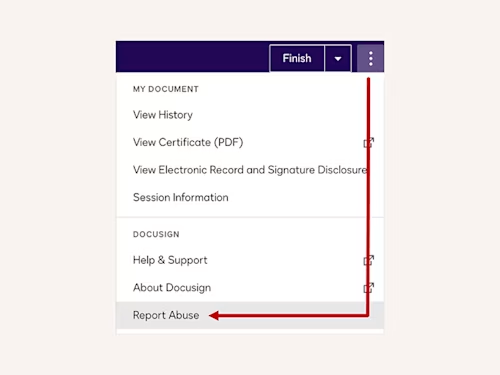
Report abuse feature
In the signing experience select the three vertical ellipses to access the Report Abuse feature.
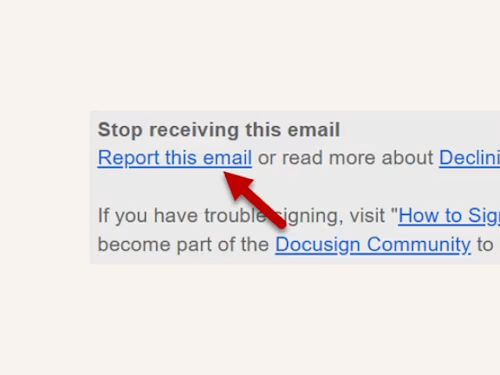
Report from email
Use the “Report this email” link found in the envelope email notification footer, as shown below:


Report crimes
Docusign does not contact law enforcement on behalf of a potential fraud victim. Report any suspected crimes using the information below. If you are unsure, contact your local authorities for additional guidance.
United States (US) | |
|---|---|
Internet fraud or cyber crime (including spoofing and phishing) | |
Scams, fraudulent businesses or unwanted calls | |
Identity theft (visit the identity theft webpage for more information) |
Non-US | |
|---|---|
International scams | |
Fraud and cyber crimes | |
Financial fraud scams (unauthorized firm or individual) |
Improper use of Docusign
Docusign takes reports of customers violating our Terms & Conditions seriously and investigate them as needed. Learn how to identify and report improper use of Docusign.
Docusign envelope email notifications are always sent from the @docusign.net domain. All Docusign envelope email notifications also include a link that directs you to our website (e.g. https://www.docusign.net) where you can access and review the envelope contents. To ensure an envelope link is legitimate, simply hover over it without clicking, as shown in the image below. A valid link may also include a prefix indicating one of several valid Docusign server designations, such as "na2", "na3", "na4", "jp", "au", "ca", "eu", or "demo" (e.g. https://www.na2.docusign.net).
Use caution before clicking on a link, as it may contain malware. If you suspect a link is malicious within any of our IAM product solutions (such as envelope links, webforms, documents, etc.), report it immediately to verify@docusign.com.
Most envelope email notifications include a 32-character security code.This identifier is unique to the document you received. This security code is in the bottom portion of the email, under the “Alternate Signing Method” section. If you are unsure about the authenticity of a Docusign envelope, you can access it directly through the “Access Documents” feature, as detailed on our Alternative Signing Method Security Code Access page.
Always use a strong, unique password for your Docusign account. Enable multi-factor authentication (MFA) for an extra layer of security. Train yourself and your employees to recognize common phishing tactics, and always use the official reporting channels to alert us to potential threats.
Impersonation: Scammers pretend to be individuals, businesses, or government agencies to trick you into sharing information or sending money.
Elder Exploitation: These scams specifically target and take advantage of older adults.
Deceptive Claims: Be wary of false claims about affiliations with well-known individuals or organizations.
Requests for Personal Information: Never share sensitive details like your Social Security number, bank account information, or credit card numbers, especially in response to an unsolicited request.
Phishing and Malware: Be cautious of emails or messages that try to trick you into revealing personal data or downloading malicious software.
Financial Schemes: This includes scams like pyramid schemes and other fraudulent activities related to investments, debt relief, loans, and real estate.
Common Scams: Watch out for common scams related to jobs, tech support, travel, and online sales.
Imitation emails and websites often use similar tricks to deceive you. Always look for urgent or threatening language and generic greetings like "Dear Customer." Check the sender's email address for subtle spelling errors or incorrect domains, and never click on suspicious links. Legitimate companies rarely ask for sensitive personal information, so be wary of any requests for your password or credit card details. Finally, a high number of spelling and grammar mistakes is a common red flag. See ourTools to Protect Your Data From Phishing blog to learn more.
Reporting phishing and fraud directly to Docusign is a vital step in protecting yourself and others. By flagging suspicious emails or texts, you help our security team quickly investigate and shut down malicious campaigns. This action helps keep everyone safe and strengthens the security of our platform. Learn more about how Docusign combats phishing.
More ways you can be fraud aware

Docusign's New ID Verification
Docusign's new ID verification methods, CLEAR and Risk-Based Verification, securely combat fraud without sacrificing user experience.

Combating Phishing
You can’t afford to take risks when documents contain highly sensitive information. Protecting your data is Docusign’s top priority.

Protecting Your Organization Against Docusign Brand Impersonation
With the number of phishing attacks growing every day, it’s essential to understand the potential threats, like brand impersonation, and how to thwart them.


