Workflow Builder
Automate your contract workflows
Boost efficiency at scale with agents in agreement workflows that seamlessly integrate with the tools you use every day.
Workflow Builder is included in all IAM plans.

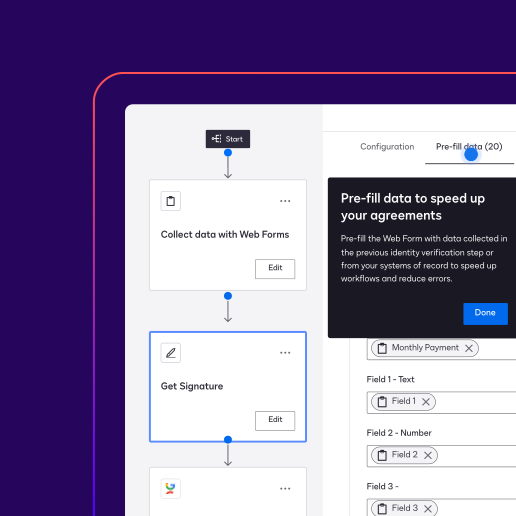
Automate agreements from start to finish
Build intelligent workflows and agents that connect pre and post signature steps like intake, document generation and conditional routing.

Design custom workflows with built-in compliance controls
Standardize contract workflows based on your unique business needs or industry regulations to support compliance and audit readiness.

Boost efficiency across teams and data
Synchronize agreement data and handoffs across third party CRM, procurement, storage, and HR systems.
How organizations use Workflow Builder
Learn how our customers have saved time and money by automating their agreement workflows.
Explore More IAM Stories Read the Full StoryHow Docusign IAM Helps KPC Private Funds Simplify Complex Investment Agreements
 Read the Full StoryThe Law Offices of Mark T. Hurt Streamlines Lead-to-Case Workflows with Docusign IAM
 Read the Full StoryCatchafire Doubles Contracting Capacity, Accelerating Nonprofit Partnerships with Docusign IAM for Sales
 Read the Full StoryMetro Credit Union Turns Digital Efficiency Into a Competitive Edge with the Docusign IAM platform
- 70%Time saved on agreement processes
- 87%+Fewer templates to manage
- 70%Time saved on agreement processes
- 87%+Fewer templates to manage

Take a guided tour of Workflow Builder
Walk through how to set up an agreement workflow, including how to add steps to extend your agreement process with integrations with third-party systems.
Capabilities you can use in your workflows
Build a signer verification step into your agreement workflows.
Capture data and dynamically populate content into agreements for signature.
Add electronic signatures to your agreement automation workflows.
Extend your workflows with partner apps like Salesforce, Google, Microsoft, ServiceNow, and more.
Add agents directly into workflows to handle dynamic, judgement-based tasks
Kick off a workflow from a request to track and manage reviews and approvals
Use workflow data to automatically generate professional-looking documents leveraging dynamic templates.
Get started quickly with our out-of-the-box templates for common agreement workflows.
See how Workflow Builder helps you build automated, intelligent agreement workflows
Workflow Builder API
Leverage the power of Docusign workflows. Enjoy greater flexibility to manage your agreements using your own code with Workflow Builder API.
Learn more about Docusign Workflow Builder


Ready to bring the power of Workflow Builder to your agreement workflows?
