Build securely with APIs and Extensions

Integrate with Agreement APIs
Create seamless customer experiences in third-party products with embeddable data and views.
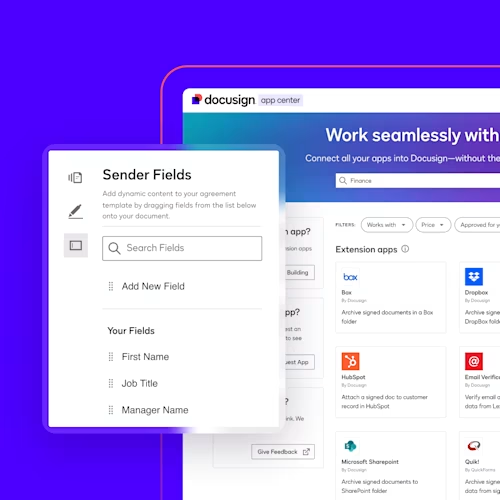
Develop Extension Apps
Bring third-party products into Docusign for seamless customer experiences.

Build Automated Workflows
Create custom processes to meet your end-to-end agreement needs.


- All
- Agreement APIs
- Extensions
- Accounting
- Construction
- Education
- Financial Services
- Government
- Healthcare
- Insurance
- Life Sciences
- Manufacturing
- Non-Profit
- Real Estate
- Retail
- HR
- IT/Operations
- Legal
- Procurement
- Sales
- All
- Agreement APIs
- Extensions
- Accounting
- Construction
- Education
- Financial Services
- Government
- Healthcare
- Insurance
- Life Sciences
- Manufacturing
- Non-Profit
- Real Estate
- Retail
- HR
- IT/Operations
- Legal
- Procurement
- Sales
- Name
- Newest
- Name
- Newest
Agreement APIs
eSignature REST API
Workflow Builder API
Agreement Manager API
Web Forms API
CLM API
Monitor API
Extensions
Data Verification
Data IO
File Archive
FAQs
Docusign APIs let you customise and extend your applications across the full agreement lifecycle — from preparing and sending agreements to tracking, storing and analysing them. With a broad set of APIs across eSignature, Web Forms, Workflow Builder, Agreement Manager, Admin and more, you can support everything from simple signature capture to complex, multi-system workflows. Common starting points include:
- Building an internal or customer-facing integration with the Docusign agreement platform using the API Integration getting started guide.
- Creating an Extension App that brings your own functionality into Docusign and publishing it in the App Centre for our customers using the Extension Apps guide.
- Building end-to-end agreement workflow automations and integrating them into your app with the Agreement Automation with Workflow Builder guide.
Docusign Quickstart helps you get started faster by generating a personalised, ready-to-run sample application preconfigured with your account settings and authentication code.
You can start building on your own with Docusign APIs at no cost by signing up for a free Docusign Developer Account. This gives you a dedicated demo environment to develop and test your integration without impacting production data or sending legally binding agreements. When you are ready, you can promote your integration to production using the Go-Live process.
To move quickly from idea to working prototype, you can:
- Use our language-specific SDKs and Quickstart projects from the SDKs overview to generate a preconfigured app with common API examples and built-in authentication flows.
- Explore hands-on tools like Postman collections, API Explorer, Sample Apps and more in the Tools overview to see real calls, workflows and troubleshooting patterns before you write code.
Yes. Docusign APIs support a wide range of enterprise-ready use cases across industries, from financial services and healthcare to public sector and technology. Teams commonly use our APIs to:
- Embed custom signing experiences so signers can review and sign agreements without leaving your website or app, including responsive and mobile-optimised experiences.
- Generate custom contracts, NDAs, onboarding forms and other documents by merging application data into reusable templates and document generation workflows.
- Verify signer identities with methods like ID verification, knowledge-based authentication (KBA) or SMS authentication before granting access to sensitive documents.
- Automatically trigger downstream workflows — such as updating a CRM, provisioning accounts or kicking off renewals — the moment agreements are signed using webhooks and workflow automation APIs.
- Collect one-time payments and deposits, or set up recurring subscriptions during the signing process via integrations with Stripe, PayPal and Braintree.
Yes. You can embed Docusign signing directly into your web or mobile application so signers never have to leave your experience. For web apps, developers typically use embedded signing flows from the eSignature REST API and test them with tools like API Explorer and Sample Apps available in the Tools overview. For mobile, Docusign provides iOS.
You can sign up for a free Docusign Developer Account in minutes on the Developer Account page. This creates a demo account that is separate from production where you can configure apps, obtain integration keys and test API calls without affecting production data.
To learn more about how developer accounts work, when you need one, and how they relate to production accounts, please see the Developer Account overview.
The Docusign Developer Centre is your central hub for all Docusign API documentation, tools and resources. It includes:
- Interactive API reference guides for each API
- Language-specific SDKs and sample code
- Quickstart projects and sample apps
- Tools for testing, monitoring and managing integrations
- Platform 101 guides, learning paths and videos
Everything is self-service so you can explore, prototype and build enterprise-ready integrations on your own schedule.
Yes. Docusign provides a Model Context Protocol (MCP) server that is currently in open beta, designed to connect Docusign capabilities to MCP-compatible AI tools like Claude, GitHub Copilot, Google Gemini and Microsoft Copilot Studio. With the Docusign MCP server, you can:
- Use natural language to explore Docusign APIs and capabilities
- Test API operations
- Automate agreement workflows through your preferred AI assistant
To get started and see supported tools and usage patterns, visit the Docusign MCP Server documentation.
When you are ready to launch, you promote your integration from your Developer (Sandbox) Account to a Production Docusign Account through our Go-Live process.
Kickstart your integration with Docusign
