Développez vos solutions en toute sécurité grâce à nos API et extensions

Intégrez grâce aux API d’accord
Créez des expériences client fluides dans des produits tiers à l’aide de données et de vues intégrables.
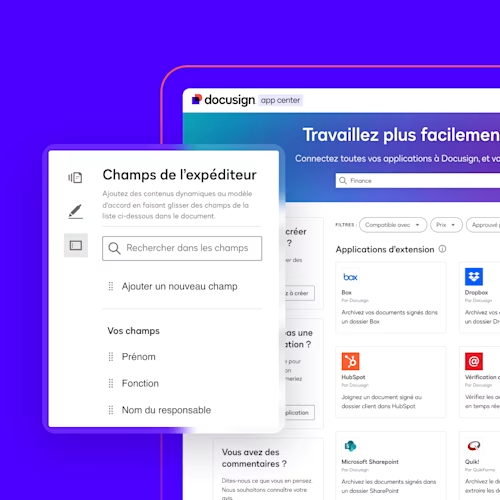
Développez des applications
Intégrez des produits tiers dans Docusign pour une expérience client fluide.

Créez des workflows automatisés
Créez des processus sur mesure pour répondre à l’ensemble de vos besoins contractuels.


- Tout
- API pour les accords
- Extensions
- Associations à but non lucratif
- Assurance
- BTP
- Comptabilité
- Distribution
- Éducation
- Immobilier
- Industrie manufacturière
- Santé
- Sciences et recherche
- Services financiers
- Services publics
- Achats
- Juridique
- Opérations IT
- RH
- Ventes
- Tout
- API pour les accords
- Extensions
- Associations à but non lucratif
- Assurance
- BTP
- Comptabilité
- Distribution
- Éducation
- Immobilier
- Industrie manufacturière
- Santé
- Sciences et recherche
- Services financiers
- Services publics
- Achats
- Juridique
- Opérations IT
- RH
- Ventes
- Nom
- Le plus récent
- Nom
- Le plus récent
API pour les accords
API REST eSignature
API Workflow Builder
API Agreement Manager
API Web Forms
API CLM
API Monitor
Extensions
Vérification des données
E/S de données
File IO
FAQ
Les API Docusign vous permettent de personnaliser et d’étendre vos applications tout au long du cycle de vie des accords, de leur préparation à leur analyse en passant par leur envoi, leur suivi et leur stockage. Avec un large éventail d’API couvrant eSignature, Web Forms, Workflow Builder, Agreement Manager, Admin et plus encore, vous pouvez prendre en charge des scénarios allant de la simple collecte de signatures aux workflows complexes impliquant plusieurs systèmes. Les points de départ les plus courants sont les suivants :
- Conception d’une intégration interne ou orientée client avec la plateforme d’accords Docusign à l’aide du guide de mise en route de l’intégration d’API.
- Création d’une application d’extension qui intègre vos propres fonctionnalités à Docusign et publication de cette dernière dans l’App Center pour nos clients à l’aide du guide des applications d’extension.
- Conception d’automatisations de workflows contractuels de bout en bout et intégration de celles-ci à votre application à l’aide du guide sur l’automatisation des processus contractuels avec Workflow Builder.
Docusign Quickstart vous aide à démarrer plus rapidement en générant un exemple d’application personnalisée et prête à l’emploi, préconfigurée avec les paramètres de votre compte et votre code d’authentification.
Vous pouvez commencer à concevoir vos propres solutions avec les API Docusign sans frais en créant un compte développeur Docusign gratuit. Cela vous offre un environnement de démonstration dédié pour développer et tester votre intégration sans affecter les données de production ou envoyer des accords juridiquement contraignants. Le moment venu, vous pouvez promouvoir votre intégration en production en utilisant le processus de mise en ligne.
Pour passer rapidement de l’idée au prototype fonctionnel, vous pouvez :
- Utiliser nos SDK propres à chaque langage et nos projets Quickstart à partir de la vue d’ensemble des SDK pour générer une application préconfigurée avec des exemples courants d’API et des flux d’authentification intégrés.
- Découvrir des outils pratiques comme les collections Postman, l’explorateur d’API, les exemples d’applications et plus encore dans la vue d’ensemble des outils pour voir des appels, des workflows et des méthodes de dépannage concrets avant d’écrire du code.
Oui, les API de Docusign prennent en charge un large éventail de cas d’utilisation adaptés aux entreprises de tous les secteurs, des services financiers à la santé en passant par le secteur public et la technologie. Les équipes utilisent généralement nos API pour :
- Intégrer des expériences de signature personnalisées pour que les signataires puissent consulter et signer des accords sans quitter votre site Web ou application, y compris des expériences adaptatives et optimisées pour les appareils mobiles.
- Générer des contrats, des accords de confidentialité, des formulaires de prise de renseignements et autres documents personnalisés en fusionnant les données d’applications dans des modèles réutilisables et des workflows de génération de documents.
- Vérifier l’identité des signataires grâce à des méthodes comme la vérification d’identité, l’authentification basée sur la connaissance (KBA) ou l’authentification par SMS avant de leur accorder l’accès à des documents sensibles.
- Déclencher automatiquement des workflows en aval (tels que la mise à jour d’un CRM, l’approvisionnement de comptes ou le lancement des renouvellements) dès la signature des accords à l’aide de webhooks et d’API d’automatisation des workflows.
- Percevoir des paiements ponctuels ou des acomptes, ou configurer des abonnements récurrents pendant le processus de signature via des intégrations avec Stripe, PayPal et Braintree.
Oui. Vous pouvez intégrer la signature Docusign directement dans votre application Web ou mobile pour que les signataires n’aient jamais besoin de quitter votre expérience. Pour les applications Web, les développeurs utilisent généralement les flux de signature intégrés issus de Docusign eSignature REST API et les testent avec des outils comme l’explorateur d’API et les exemples d’applications disponibles dans la vue d’ensemble des outils. Pour les appareils mobiles, Docusign propose iOS.
Vous pouvez créer un compte développeur Docusign gratuit en quelques minutes sur la page du compte développeur. Cela crée un compte de démonstration distinct de la production, dans lequel vous pouvez configurer des applications, obtenir des clés d’intégration et tester des appels d’API sans affecter les données de production.
Pour connaître le fonctionnement des comptes développeur, savoir quand il vous en faut un et comprendre leur lien avec les comptes de production, consultez la vue d’ensemble du compte développeur.
Le Developer Center Docusign est une plateforme qui centralise toute la documentation, tous les outils et toutes les ressources de l’API Docusign. Elle inclut :
- Des guides de référence interactifs pour chaque API
- Des SDK propres à chaque langage et des exemples de code
- Des projets Quickstart et des exemples d’applications
- Des outils pour tester, surveiller et gérer les intégrations
- Des guides d’initiation à la plateforme, des parcours d’apprentissage et des vidéos
Tout se fait en libre-service : vous pouvez explorer, prototyper et créer des intégrations adaptées aux entreprises à votre propre rythme.
Oui. Docusign fournit un serveur MCP (Model Context Protocol) actuellement en version bêta ouverte. Il est conçu pour connecter les capacités de Docusign aux outils d’IA compatibles MCP comme Claude, GitHub Copilot, Google Gemini et Microsoft Copilot Studio. Avec le serveur MCP de Docusign, vous pouvez :
- Utiliser le langage naturel pour découvrir les API et les capacités de Docusign
- Tester les opérations d’API
- Automatiser vos workflows contractuels en vous appuyant sur l’assistant IA de votre choix
Pour vous lancer et découvrir les outils et les types d’utilisation pris en charge, consultez la documentation du serveur MCP de Docusign.
Lorsque le moment de vous lancer arrive, vous promouvez votre intégration depuis votre compte développeur (sandbox) vers un compte Docusign de production via notre processus de mise en ligne.
C’est parti pour votre intégration avec Docusign
