強力なAPIと柔軟な拡張性
セキュアな基盤で理想の契約体験を構築

契約APIとの統合
サードパーティ製品に埋め込み可能なデータやビューを活用し、シームレスな顧客体験を創出します。
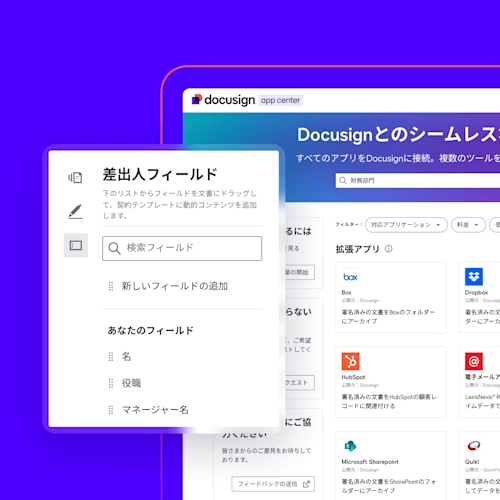
拡張アプリの開発
Docusignの豊富な機能を活用し、お客様のビジネスに最適化されたカスタムアプリを開発。固有の課題解決や、これまでにない顧客体験のデザインが可能です。
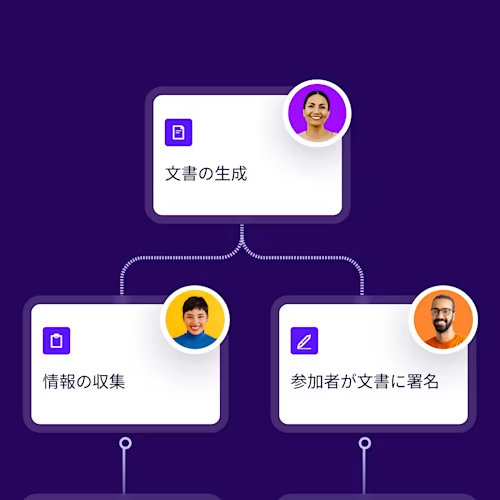
自動化されたワークフローの構築
契約の準備から締結、活用まで、全プロセスを自動化。お客様独自のワークフローを構築し、業務効率を飛躍的に高めます


- すべて
- 契約API
- 会計
- 教育
- 建設
- 政府機関
- 製造
- ライフサイエンス
- 医療
- 保険
- 不動産
- 非営利団体
- 小売
- 金融サービス
- IT/システム運用
- 人事
- 営業
- 調達
- 法務
- すべて
- 契約API
- 会計
- 教育
- 建設
- 政府機関
- 製造
- ライフサイエンス
- 医療
- 保険
- 不動産
- 非営利団体
- 小売
- 金融サービス
- IT/システム運用
- 人事
- 営業
- 調達
- 法務
- 名前
- 最新
- 名前
- 最新
契約API
eSignature REST API
Workflow Builder API
Agreement Manager API
Web Forms API
CLM API
Monitor API
Admin API
クリックAPI
Trust Service Provider API
IDエビデンスAPI
FAQ
Docusign APIを使用すれば、契約書の作成や送信から追跡、保管、分析まで、契約のライフサイクル全体を通じてアプリケーションをカスタマイズおよび拡張できます。eSignature、Web Forms、Workflow Builder、Agreement Manager、Adminなど、豊富なAPIセットを活用することで、シンプルな署名の取得から複数のシステムにわたる複雑なワークフローまで幅広く対応可能です。一般的な導入例は次のとおりです。
- APIインテグレーション入門ガイドを使用して、社内または顧客向けにDocusign契約プラットフォームとのインテグレーションを構築する。
- 拡張アプリガイドを使用して、独自の機能をDocusignに導入する拡張アプリを作成し、Docusignの顧客向けにApp Centerで公開する。
- Workflow Builderを使用した契約自動化ガイドを使用して、エンドツーエンドの契約ワークフローの自動化を構築し、アプリに統合する。
Docusign Quickstartは、お客様のアカウント設定と認証コードをあらかじめ組み込んだ、パーソナライズ済みで実行可能なサンプルアプリケーションを生成することで、より迅速な導入をサポートします。
無料のDocusign開発者アカウントに登録すると、Docusign APIを使用した開発を追加料金なしで開始できます。専用のデモ環境が提供されるため、本番データに影響を与えたり、法的拘束力のある契約を送信したりすることなく、インテグレーションの開発とテストを進められます。準備ができたら、Go-Liveプロセスを使用してインテグレーションを本番環境に移行できます。
アイデアから実用的なプロトタイプへと迅速に移行するには、以下をお試しください。
- SDKの概要の言語別SDKとQuickstartプロジェクトを使用して、一般的なAPIの例と組み込みの認証フローを備えた事前設定済みアプリを生成しましょう。
- ツールの概要でPostmanコレクション、API Explorer、サンプルアプリなどの実践的なツールを活用することで、コードを書く前に、実際の呼び出し、ワークフロー、トラブルシューティングのパターンを確認しましょう。
はい。Docusign APIは、金融サービス、ヘルスケア、公共部門、テクノロジーなど、さまざまな業界でエンタープライズ対応の幅広いユースケースをサポートしています。企業の各部門は一般的に、次の目的でAPIを使用しています。
- 署名者がWebサイトやアプリを離れることなく契約内容を確認・署名できるよう、カスタム署名体験を組み込みます。これにはレスポンシブでモバイルに最適化された体験も含まれます。
- アプリケーションのデータを再利用可能なテンプレートおよび文書生成ワークフローにマージして、カスタム契約書、秘密保持契約、オンボーディングフォームなどの文書を作成します。
- 機密文書へのアクセスを許可する前に、身分証明書による本人確認、知識ベース認証(KBA)、SMS認証などの方法で署名者の本人確認を行います。
- Webhookやワークフロー自動化APIを使用して、契約締結の瞬間にCRMの更新、アカウントのプロビジョニング、契約更新の開始といった後続のワークフローを自動的にトリガーします。
- Stripe、PayPal、Braintreeとの連携により、署名プロセス中に1回限りの支払いやデポジットの収集、定期支払いの設定を行うことができます。
はい。Docusignの署名機能をWebまたはモバイルアプリケーションに直接埋め込むことで、署名者はアプリケーションを離れることなく手続きを完了できるようになります。Webアプリケーションの場合、開発者は通常、eSignature REST APIの組み込み署名フローを使用します。実装のテストには、ツールの概要からアクセスできるAPIエクスプローラーやサンプルアプリなどを活用できます。また、モバイル向けにはiOS版も提供しています。
無料のDocusign開発者アカウントは、開発者アカウントページから数分で登録できます。これにより、本番環境とは別のデモアカウントが作成され、本番データに影響を与えることなく、アプリの設定、インテグレーションキーの取得、API呼び出しのテストを行えます。
開発者アカウントの仕組みや必要となるタイミング、本番環境アカウントとの関連性については、開発者アカウントの概要をご覧ください。
Docusignデベロッパーセンターは、Docusign APIに関するすべてのドキュメント、ツール、リソースを集約した中央ハブで、以下の内容が含まれています。
- 各APIのインタラクティブなAPIリファレンスガイド
- 言語別のSDKとサンプルコード
- Quickstartプロジェクトとサンプルアプリ
- インテグレーションのテスト、監視、管理を行うツール
- プラットフォームの基本ガイド、学習パス、および動画
すべてがセルフサービス形式のため、自分のペースでインテグレーションを探求、試作し、エンタープライズ対応のシステムを構築できます。
はい。Docusignは現在、オープンベータ版のModel Context Protocol(MCP)サーバーを提供しています。これは、Claude、GitHub Copilot、Google Gemini、Microsoft Copilot StudioなどのMCP対応AIツールにDocusignの機能を接続させるためのものです。Docusign MCPサーバーを使用すると、次のような操作を実行できます。
- 自然言語を使ってDocusignのAPIや機能を探索する
- APIの操作をテストする
- お好みのAIアシスタントを通じて契約ワークフローを自動化する
開始方法や対応しているツール、使用パターンについては、Docusign MCPサーバーのドキュメント をご覧ください。
公開の準備ができたら、Go-Liveプロセスを使用して、開発者(サンドボックス)アカウントから本番環境のDocusignアカウントにインテグレーションを移行します。
Docusignで効率的なシステム統合を実現
